The platform you choose to build your online store will shape everything: how much flexibility you have, what you’ll pay over three years, how your SEO performs, and how painful it will be if you ever need to switch.
Most articles comparing e-commerce platforms are written by companies that only build one of them. A Shopify agency recommends Shopify. A WordPress shop recommends WooCommerce. Their articles are useful, but they’re not objective.
We build WooCommerce stores and custom e-commerce applications. We don’t build Shopify stores but if Shopify is right for your situation, we’ll tell you directly, because referring you correctly is how we build a reputation worth having. That’s the position this guide is written from.
Here’s the honest comparison.
The Short Answer
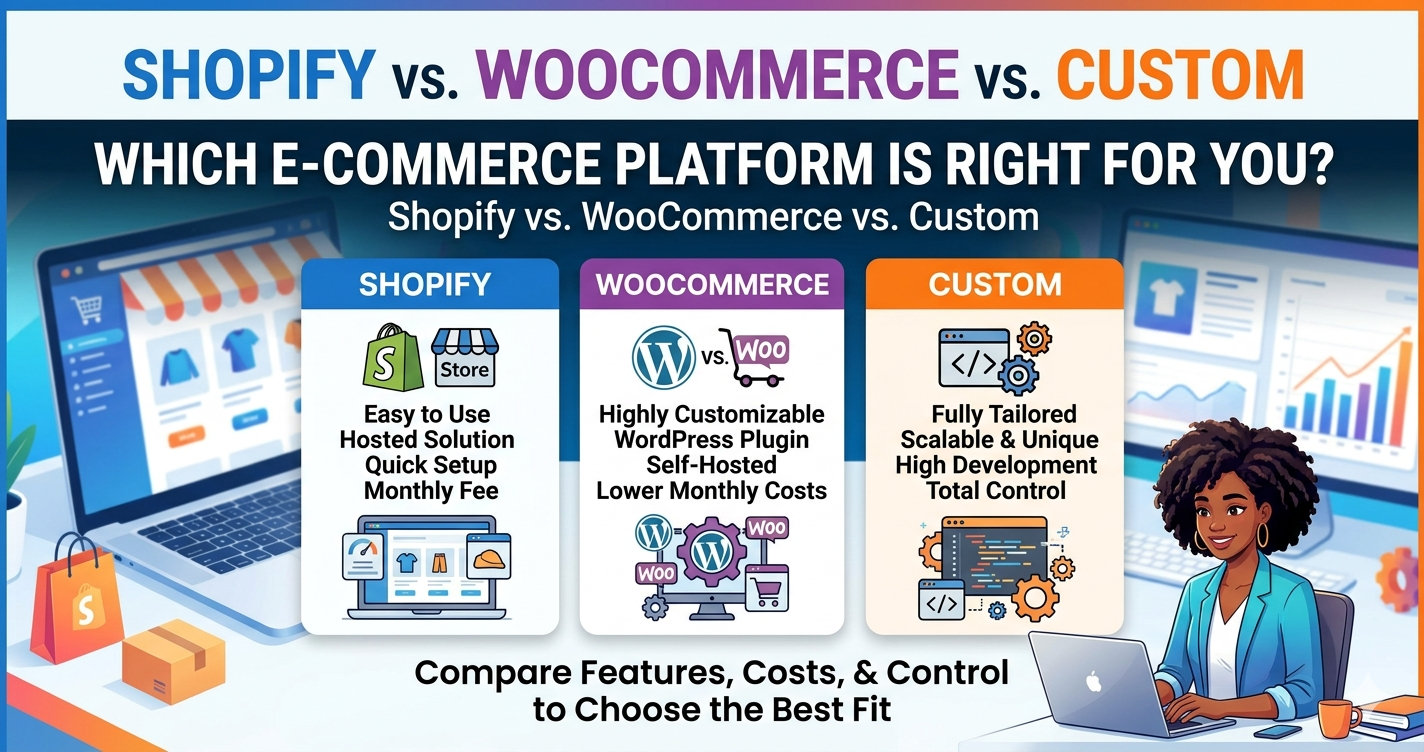
If you need a fast comparison before reading the full breakdown:
| Shopify | WooCommerce | Custom | |
|---|---|---|---|
| Best for | Product first businesses, simple catalogs | Content heavy sites, existing WordPress | Unique business logic, scale |
| Setup time | Days to weeks | 2–6 weeks (with developer) | 8–16 weeks |
| Monthly cost | $79–$399+ plans + apps | $30–$80 hosting + maintenance | Lower per order at scale |
| Upfront cost | Low–Medium | Medium | High ($15,000–$50,000+) |
| Data ownership | Shopify’s servers | Your servers | Your servers |
| SEO control | Moderate | Full | Full |
| Design flexibility | Moderate (theme constraints) | High | Complete |
| Custom functionality | Expensive (apps) | Moderate (plugins/code) | Unlimited |
One sentence decision rule: If you’re launching quickly with a simple product catalog, Shopify. If content marketing is your growth strategy or you’re on WordPress already, WooCommerce. If your business has purchasing logic that doesn’t fit a standard template, custom.
Shopify What It Is and When It Wins
Shopify is a fully hosted SaaS e-commerce platform. You pay a monthly subscription, and Shopify handles hosting, security, updates, and PCI compliance. You log into their interface, upload products, configure payments, choose a theme, and you’re selling.
Where Shopify genuinely wins
Fastest path to revenue. A Shopify store with a paid theme can be live in days. If you’re launching a new product line, running a campaign with a hard deadline, or just need to start selling before anything else, Shopify removes every infrastructure barrier.
Retail and POS integration. Shopify’s native POS system is the best in the market for unified online/offline selling. If you have a physical retail location that you’re extending online, Shopify’s POS sync is a real advantage.
No infrastructure management. Hosting, server security, updates, uptime Shopify handles all of it. You never patch a plugin or worry about your server going down during a sale.
Best in class mobile app. Managing orders, inventory, and shipping from a phone is genuinely good on Shopify. For solopreneurs running their business from mobile, this matters.
Where Shopify loses
Monthly costs compound. The $79/month Basic plan sounds reasonable. Add the apps you actually need email marketing, upsells, reviews, subscription billing, advanced analytics and a fully equipped Shopify store commonly runs $300–$600/month in platform costs alone. Then add transaction fees (0.5–2% on Basic and Shopify plans if you don’t use Shopify Payments).
SEO limitations are real. Shopify imposes URL structure constraints that WooCommerce doesn’t. Blog posts sit at /blogs/news/slug instead of /blog/slug. You can’t easily change the /collections/ and /products/ URL structure. For product first businesses, this is manageable. For businesses where SEO is the primary growth channel, it’s a genuine constraint.
Design flexibility hits walls. Shopify themes are professional, but they’re shared with thousands of other stores. Deep customization requires Liquid (Shopify’s templating language) and a developer relationship. You won’t rebuild the checkout flow without significant cost.
Your data lives in Shopify’s system. Technically you can export it, but migrating customer data, order history, and product information off Shopify is not a trivial operation.
When to choose Shopify
- Product only business with a simple catalog (under a few hundred SKUs)
- No existing WordPress presence
- Physical retail location that needs online/POS sync
- Need to launch in under four weeks
- No intention of building a content driven SEO strategy
- Monthly subscription cost is acceptable for your margin structure
WooCommerce What It Is and When It Wins
WooCommerce is a free, open source e-commerce plugin that runs on WordPress. According to BuiltWith’s e-commerce tracking data, WooCommerce is the most widely deployed e-commerce solution globally. It adds a complete online store product catalog, checkout, payments, inventory, shipping to any WordPress installation. Because WordPress powers the underlying site, WooCommerce stores have everything WordPress provides: full SEO control, a mature blogging system, a plugin ecosystem, and complete server ownership.
Where WooCommerce genuinely wins
You own everything. Your store runs on hosting you control. Your customer data, order history, and product catalog live in your database. You’re not locked into any platform switch hosts, switch agencies, or bring development in house without asking anyone’s permission.
Full SEO control. WordPress gives you complete control over URL structure, meta titles and descriptions, heading hierarchy, schema markup, and site architecture. For businesses where SEO is a primary growth channel and for most small businesses, it should be this matters. Shopify’s constraints are manageable; WooCommerce’s constraints are essentially zero.
Content + commerce in one system. If you’re running a blog that drives traffic to your store, WooCommerce is the natural choice. Your content and your store are in the same CMS, with the same SEO framework, the same internal linking structure. Shopify’s blog functionality exists but it’s clearly secondary.
Lower long term recurring cost. A professionally hosted WooCommerce store runs $30–$80/month in hosting plus $150–$300/month in maintenance if you’re using an agency. No transaction fees beyond standard payment processor rates (typically 2.9% + $0.30 for Stripe or similar). Compare that to Shopify’s plan + app stack over three years.
More flexible product types. Variable products, subscription products, downloadable products, bookable products, composite products, B2B pricing tiers WooCommerce’s extension ecosystem handles edge cases that Shopify struggles with or prices expensively.
Where WooCommerce loses
You manage (or pay someone to manage) the infrastructure. WordPress core, WooCommerce, themes, and plugins all require regular updates. Security monitoring, backup testing, and uptime management are your responsibility either directly or through a maintenance service. Shopify removes this burden; WooCommerce does not.
More moving parts. A WooCommerce store is a WordPress site with a payment processor, a plugin, a theme, and a hosting configuration. When something breaks, there are more places to look. Shopify’s support team handles their platform; WooCommerce support is fragmented across plugin authors.
Harder for non technical users to set up correctly. You can set up WooCommerce yourself but a professionally built WooCommerce store with performance optimization, proper hosting, and clean code requires a developer. A Shopify store is genuinely approachable for a determined non technical founder.
For a deep dive on WooCommerce specifically in a small business context, see our WooCommerce development guide for small business.
When to choose WooCommerce
- You already have a WordPress site
- Content marketing (blog driven SEO) is your primary growth strategy
- You want full data ownership and server control
- Monthly recurring costs are a concern
- You need product types or integrations not well supported in Shopify
- You’re planning a rebuild/migration from a different platform anyway
Custom E-Commerce What It Is and When It Wins
Custom e-commerce development means building your online store from scratch not on Shopify’s SaaS platform, not on WooCommerce’s plugin framework, but on code written specifically for your business.
At DevVerx, we build custom stores on two primary stacks: MERN (MongoDB, Express, React, Node.js) for modern JavaScript applications with real time features and React based UIs, and Laravel/PHP for more traditional server side applications that need structured data, complex business logic, and strong query performance.
Where custom genuinely wins
Unique purchasing flows. If your customers configure products before purchase (build to order, custom bundles, configure to price), if you’re running a multi vendor marketplace, or if your checkout involves logic that doesn’t fit a linear add to cart flow custom development is the only real option. Shopify apps and WooCommerce plugins can approximate some of these, but they’re fighting the platform’s default assumptions.
System integrations. Custom ERPs, proprietary inventory systems, complex B2B pricing engines, contract based billing these integrations require custom code regardless of which platform you start on. If you’re going to spend significant development time on integrations anyway, building on a custom foundation that you fully control is often more cost effective long term.
Performance at scale. A WooCommerce store with 50,000+ SKUs and complex variable product relationships can run into performance limitations that are difficult to resolve without architectural changes. A custom built store can be designed from the start for the data model your business actually has.
No platform constraints ever. Shopify changing its pricing structure, WooCommerce requiring a major migration for a version update, a plugin author abandoning their plugin none of these exist on a custom build. You own the code. The decisions are yours.
Where custom loses
Highest upfront cost. A production ready custom e-commerce application built by a professional development team typically starts at $15,000 and can reach $50,000+ for complex requirements. That’s a real number that needs to be justified by the business case.
Longest time to launch. 8–16 weeks minimum for a professional custom build. If speed to market is the priority, custom is not the answer.
Requires an ongoing developer relationship. A custom codebase needs developers to maintain, extend, and debug it. You’re not installing a plugin you’re maintaining a software system. Factor in ongoing development costs when evaluating total cost of ownership.
The “custom is overkill” test
Ask this before scoping a custom build: Can Shopify or WooCommerce do what I need with one plugin, a standard integration, or a minor configuration? If yes if you’re considering custom because you want a unique design or a slightly different checkout flow custom is overkill. Design and UX problems are solved in WooCommerce by building a custom theme, not a custom platform.
Custom development is justified when the business logic doesn’t fit the platform’s model, not when the design needs are beyond a standard theme.
For a full breakdown of when custom e-commerce makes sense and what the build process looks like, see our custom e-commerce development guide.
When to choose custom
- Unique purchasing flow that platforms can’t accommodate cleanly
- Multi vendor marketplace
- Complex B2B pricing, contract based billing, or configure to order
- Existing tech stack that needs deep integration (proprietary ERP, CRM, etc.)
- Projected transaction volume where per order infrastructure costs matter
- A business model that doesn’t fit Shopify’s or WooCommerce’s assumptions
Full Head to Head Comparison
| Factor | Shopify | WooCommerce | Custom |
|---|---|---|---|
| Setup complexity | Low | Medium | High |
| Time to launch | Days–weeks | 2–6 weeks | 8–16 weeks |
| Monthly platform cost | $79–$399+ | $30–$80 hosting | Hosting only after build |
| Transaction fees | 0.5–2% (if not using Shopify Payments) | 0% (use any gateway) | 0% (use any gateway) |
| Upfront build cost | Low (template) | $5,000–$20,000 | $15,000–$50,000+ |
| Hosting | Included (Shopify’s servers) | Self managed or managed WP | Self managed |
| Security management | Shopify handles | Developer/agency handles | Developer/agency handles |
| SEO control | Moderate (URL constraints) | Full | Full |
| Design flexibility | Moderate (theme system) | High | Complete |
| Custom functionality | Apps (often expensive) | Plugins + custom code | Unlimited |
| Blog/content | Basic (/blogs/news/) | Full WordPress CMS | Custom or headless CMS |
| Data ownership | Shopify’s servers | Your servers | Your servers |
| Multi currency | Built in (Advanced+) | Plugin required | Custom implementation |
| POS integration | Excellent (native) | Possible (plugin) | Custom |
| Scalability | Good for most SMBs | Good, complex at high volume | Designed to spec |
| Migration out | Difficult | Moderate | Full control |
Total Cost of Ownership: 3 Year Comparison
The monthly pricing Shopify advertises and the actual 3 year cost of operating each platform are different numbers. Statista’s e-commerce industry data shows continued growth in online retail, making platform choice an increasingly high stakes decision. Here’s a realistic comparison for a mid sized small business store (30–300 SKUs, modest monthly transaction volume):
Shopify 3 Year TCO
- Plan: $79/month × 36 = $2,844
- Essential apps (email, reviews, upsells, bundles, advanced reports): $150–$400/month × 36 = $5,400–$14,400
- Theme (premium, one time): $300–$400
- Transaction fees at 1% on $20,000/month revenue: $7,200
- Developer for customization (occasional): $2,000–$5,000
- 3 year total: $17,744–$29,844
WooCommerce 3 Year TCO
- Managed WordPress hosting: $50/month × 36 = $1,800
- Maintenance retainer: $200/month × 36 = $7,200
- Plugin licenses (annual): $300/year × 3 = $900
- Initial professional build: $8,000–$15,000
- Payment processing: standard gateway rates (no platform surcharge)
- 3 year total: $17,900–$24,900
Custom 3 Year TCO
- Initial build: $20,000–$35,000 (amortized across 3 years)
- Hosting + DevOps: $80/month × 36 = $2,880
- Ongoing development (maintenance + features): $300/month × 36 = $10,800
- 3 year total: $33,680–$48,680
The takeaway: Shopify and WooCommerce are comparable in 3 year TCO for a small business store. Custom is higher upfront and comparable or lower per order at scale. The choice shouldn’t be made purely on cost it should be made on fit, control, and growth trajectory.
See our e-commerce website cost guide for a full breakdown of what drives costs at each tier.
The Platform Doesn’t Rank Your Store Does
A common version of this question is: “Is Shopify or WooCommerce better for SEO?”
The honest answer: the platform matters far less than how it’s implemented.
Google doesn’t have a preference for Shopify or WooCommerce. It indexes pages, evaluates content quality, measures page speed, and assesses domain authority. Both platforms can rank well. Both can rank poorly. The implementation how the site is structured, how content is created, how technical SEO is handled matters more than the platform choice.
That said, WooCommerce has a genuine structural advantage for content heavy stores: the WordPress CMS is the world’s best developed blogging infrastructure. Internal linking between blog content and product pages, schema markup, URL structure control, and content management for non technical teams are all mature and well supported. For businesses where content marketing is the primary SEO strategy, WooCommerce is the better foundation.
Shopify’s limitations (URL structure constraints, less flexible canonical tags, /blogs/news/ blog path) are manageable for product focused businesses, but they require more workarounds.
Migration Considerations
If you’re already on one platform and considering a switch, understand what “migration” actually means before you start.
Shopify → WooCommerce: Doable, but involves exporting products/customers/orders in Shopify’s format and importing to WooCommerce. Product variants, metafields, and order history can lose fidelity. Redirect mapping for every URL (Shopify uses /products/slug; WooCommerce uses /product/slug by default) is required to preserve SEO equity. Plan 2–4 weeks of migration work minimum.
WooCommerce → Custom: The most common DevVerx engagement. Because WooCommerce data lives in a MySQL database you control, extraction is clean. The challenge is recreating the catalog, order logic, and admin workflows in a new codebase not data portability, but development scope. For a discussion of where custom is worth that investment, see our WordPress vs. custom development comparison.
Shopify → Custom: Similar to WooCommerce → Custom in scope, with the added complexity of extracting from Shopify’s data model. Shopify’s export tools are reasonably complete for products and customers; order history completeness varies.
The key rule: if your current platform is working for 80% of your needs and you’re considering migration for one specific limitation, exhaust the plugin/app/customization options first. Migration has real costs in developer time, SEO risk during transition, and operational disruption.
What DevVerx Recommends
We’re a WooCommerce and custom e-commerce shop. But here’s our honest platform guidance:
We’d point you to Shopify if: You’re launching your first product based business, you don’t have existing WordPress infrastructure, and you need to start selling within the next 30 days. Shopify is genuinely excellent at what it does, and building on it is the right call for the right business.
We’d recommend WooCommerce if: You already have a WordPress site, content marketing is part of your growth plan, or you want to own your data and keep monthly costs predictable. We build professional WooCommerce stores custom themes, performance optimization, proper hosting configuration and we’re proud of that work. DevVerx’s 4.8/5 client rating across 15+ years reflects the quality we bring to every build.
We’d recommend custom development if: Your business model doesn’t fit Shopify’s or WooCommerce’s assumptions complex B2B workflows, unique configurator flows, deep ERP integration, or multi vendor architecture. Custom development is the right answer when you need software designed for your specific business, not a platform adapted to it.
Ready to discuss which approach makes sense for your situation? Book a free strategy call with DevVerx we’ll tell you exactly which direction fits your business, even if it’s Shopify.
Explore our e-commerce development services to see what we build.
Frequently Asked Questions
Is Shopify or WooCommerce better for SEO?
Both can rank well. WooCommerce has structural SEO advantages full URL control, WordPress’s mature content infrastructure, no platform imposed constraints that make it a better foundation for content driven SEO strategies. Shopify’s URL limitations are real but manageable for product first businesses. The execution matters more than the platform.
How much cheaper is WooCommerce than Shopify long term?
For a mid sized small business store, the 3year total cost of ownership is often comparable ($17,000–$25,000 range for both). WooCommerce’s recurring costs are lower, but the upfront professional build cost is higher. Shopify’s low upfront cost is offset by app subscriptions and transaction fees. Run the full math for your specific situation.
Can I switch from Shopify to WooCommerce later?
Yes, but it requires real migration work: exporting and re importing product, customer, and order data; redirecting every URL; and rebuilding the theme/design in WooCommerce. Plan for 2–4 weeks of developer time and some SEO disruption during transition. It’s better to choose the right platform at the start.
What size business needs custom e-commerce development?
Business requirements, not size, determine when custom is appropriate. A small business with a unique configure to order purchasing flow may need custom development. A large business with a simple product catalog may not. If Shopify or WooCommerce can handle your business logic with standard functionality, custom isn’t necessary regardless of size.
Does DevVerx build Shopify stores?
No we build WooCommerce stores and custom e-commerce applications. But we’ll tell you honestly if Shopify is the right choice for your business. Our reputation is built on giving clients the right recommendation, not on landing every project.