Your website is open for business 24 hours a day, 7 days a week. The question is whether it’s doing any actual work, or quietly sending customers to your competitors.
Most small business owners don’t realize there’s a problem until they notice it in the revenue. Fewer calls. Fewer form submissions. New clients who don’t mention finding them online. These are the classic signs your website is losing you customers, and by the time the pattern is visible, the site has been bleeding leads for months.
The frustrating part is that most of these problems are diagnosable. You don’t need an agency to tell you your site is underperforming; you need a checklist. Here are nine specific, checkable signs that your website is costing you customers, along with exactly what to do about each one.
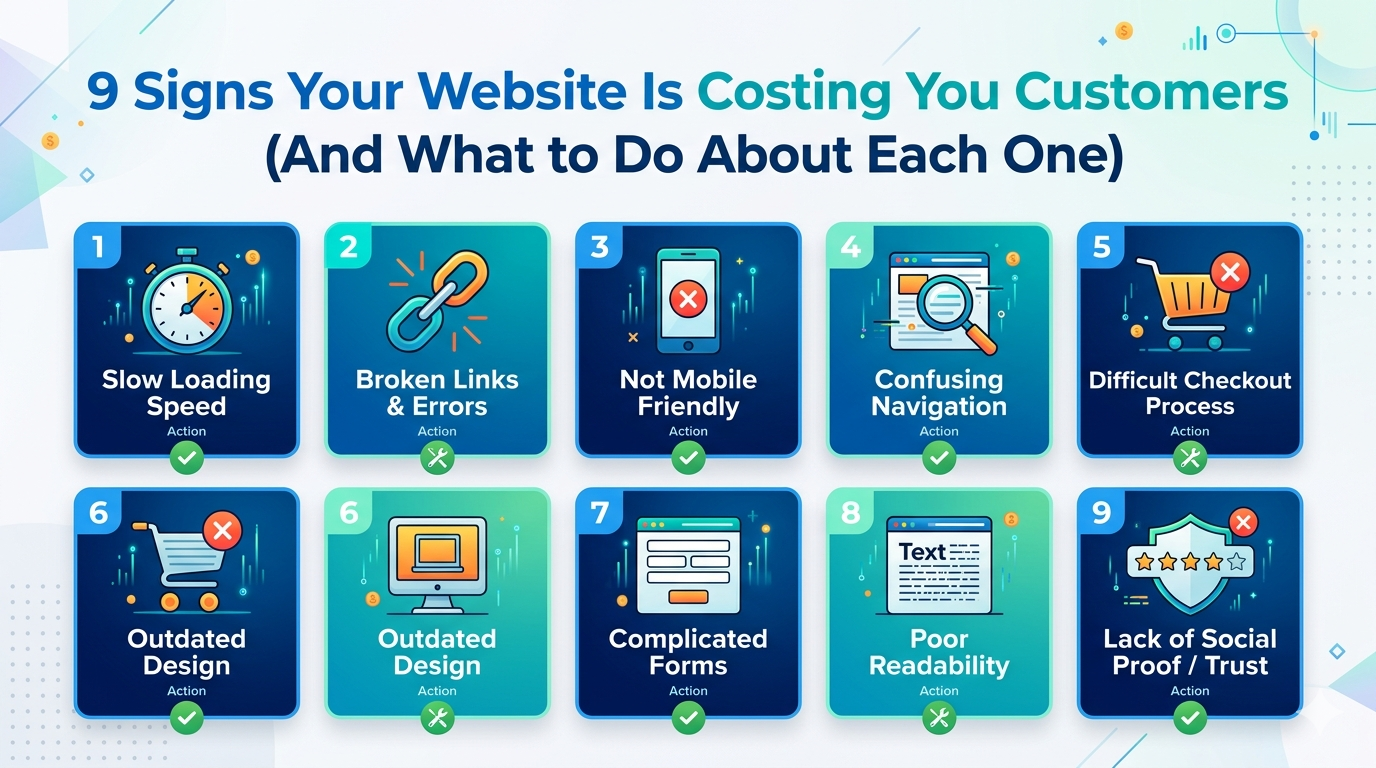
The 9 signs at a glance:
1. Your site takes more than three seconds to load
2. Visitors can’t tell what you do in five seconds
3. You’re getting traffic but no one is contacting you
4. Your contact info is hard to find or your form doesn’t work
5. The design looks like it was built before your last hire
6. It doesn’t work properly on mobile
7. There are no trust signals anywhere on the page
8. Your site isn’t showing up on Google
9. Your own team won’t send prospects to it
Sign 1: Your Site Takes More Than 3 Seconds to Load
Speed isn’t a nice to have. According to Google’s research, 32% of visitors abandon a site if it takes more than three seconds to load. At ten seconds, the probability of bounce increases by 123% compared to a one second load time. Amazon has calculated that every 100 milliseconds of latency costs them 1% in revenue, and your visitors are no more patient than Amazon’s.
How to check it: Go to Google PageSpeed Insights and enter your URL. It’s free and takes under a minute. Focus on the mobile score, if it’s below 70, or if your Largest Contentful Paint (LCP) is above 2.5 seconds, you have a measurable speed problem.
Quick fixes you can do yourself: Compress images using a tool like Squoosh or ShortPixel. On WordPress, install a caching plugin (WP Rocket or W3 Total Cache). Remove plugins you don’t actively use, every inactive plugin still adds load weight.
When to call a professional: If your load time consistently exceeds five seconds after trying the above, the problem is usually at the infrastructure level, hosting, unoptimized code, or a bloated theme that needs a developer to address. Understanding how Core Web Vitals affect your search rankings will help you frame that conversation.
Sign 2: Visitors Can’t Tell What You Do in 5 Seconds
Open your homepage right now. Cover your logo with your hand. Read the headline. If a stranger couldn’t tell what your business does and who it’s for from that headline alone, your above fold content is failing you.
This isn’t a writing problem, it’s a positioning problem. Most business websites are written from the inside out: they describe what the company is, rather than what the customer gets. Visitors don’t read websites; they scan them looking for a reason to stay. A vague headline gives them no reason.
How to check it: Run a five second test. Share your homepage with someone who doesn’t know your business. After five seconds, close the tab and ask them: “What does this company do? Who is it for? What should you do next?” If the answers are wrong or unclear, your homepage is failing the test real visitors take unconsciously every day.
Quick fix: Rewrite your main headline using this structure: “We help [specific audience] achieve [specific outcome] by [brief method].” It doesn’t need to be poetic. It needs to be clear. “We help Ohio HVAC companies get more service calls through their website” beats “Delivering digital excellence for your business” in every test.
When to call a professional: If your entire site is structured around your company instead of your customer, service descriptions that list features, an “about us” page that reads like a press release, no mention of specific results, the problem is architectural and needs a full content rethink.
Sign 3: Your Website Is Not Generating Leads Despite Getting Traffic
A website not generating leads despite receiving traffic is one of the most expensive problems a small business can have, because you’re paying to attract visitors (through SEO effort, ads, or time) and getting nothing in return. According to research from First Page Sage, the average website conversion rate across industries is around 2.4%. If your site gets 500 visitors per month and generates two or three inquiries, your conversion rate is below 1%, and it’s costing you real leads every single month.
Here’s the math: 500 visitors at 1% conversion equals five leads. At 3%, that’s 15 leads. That’s ten additional prospects per month from the exact same traffic. No increase in ad spend. No new SEO effort. Just a site that’s set up to convert.
How to check it: Open Google Analytics 4 and look for conversion events. If you don’t have conversion tracking set up, if the concept of a “goal” or “conversion event” in GA4 is unfamiliar, that’s already a problem. You’re flying without instruments.
Quick fixes: Add a clear, specific call to action above the fold on every key page. Make it obvious what you want the visitor to do: call, email, or fill out a form. Remove friction from your contact form, every additional field reduces completion rates by roughly 10%. Add a phone number to your site header where it’s visible without scrolling.
When to call a professional: If you have steady traffic and near zero conversions, the site needs a conversion audit. This goes deeper than quick fixes, it involves reviewing page structure, user flow, trust signals, and CTA placement across the full site.
Sign 4: Your Contact Info Is Hard to Find, Or Your Form Doesn’t Work
This one seems obvious, but it’s more common than you’d expect. Time yourself finding the phone number on your homepage right now. If it takes more than three seconds, it takes every visitor that long too. Many give up before they get there.
The subtler version of this problem is a contact form that’s broken. The button submits. The confirmation message appears. And the submission goes nowhere, either to a spam folder, a disconnected email address, or a form plugin that silently fails. You’d never know unless you tested it.
Tom, who runs a landscaping company in suburban Chicago, spent three months wondering why his redesigned site wasn’t generating calls. His old site averaged eight to ten inquiries per month. The new one: two. When he finally tested the contact form himself, from his phone, using a personal email address, he got no confirmation email, and the submission never appeared in his inbox. The form had been broken since launch day.
How to check it: Test your contact form right now from a different device, using a personal email address. Confirm you receive a notification. Check your phone header and footer for a visible phone number. If you use Google Business Profile, make sure the phone number matches.
Quick fixes: Move your phone number into the site header. Add a tel: link so mobile users can tap to call. Test your form monthly.
When to call a professional: CRM integrations, SMTP configuration for form delivery, and multi step form setups require developer support when they break.
Sign 5: An Outdated Website Design Is Quietly Costing You Trust
Design ages faster than most business owners realize, and an outdated website losing customers is rarely obvious from the inside. A site that looked clean and modern in 2019 now communicates something specific to visitors: this business hasn’t invested in itself recently.
Research from Stanford’s Web Credibility Project found that 75% of people judge business credibility from website design. And according to web design research published in 2025, 48% of users cite design as the top factor in deciding whether to trust a business. That judgment happens in under a second. Before your visitor reads a single word, they’ve already formed an opinion based on what they see.
Dating signals to look for: full width image sliders that auto advance (a 2012 trend that harms conversions), stock photos of people in business attire shaking hands or pointing at laptops, non responsive layouts that require horizontal scrolling on a phone, and fonts that predate the variable font era.
How to check it: Pull up your site on your phone. Look at it as if you’d never seen it before. Would you trust this business with a $5,000 purchase or a significant service engagement? Be honest.
Quick fix: Update the photography first, real photos of your team, your location, and your work outperform stock imagery for trust and conversion. Update your homepage hero text. These are the highest visibility, lowest effort improvements.
When to call a professional: If the layout itself is the problem, a fixed width design, a dated structure that doesn’t translate to mobile, or a theme that can’t be modernized without rebuilding, that’s a redesign conversation. Understanding how much a website redesign actually costs for a small business will help you plan the investment.
Sign 6: It Doesn’t Work Properly on Mobile
According to Statista, 63% of global web traffic now comes from mobile devices. For local service businesses, HVAC, landscaping, dental, legal, that number is often higher, because people search for local services on their phones in the moment they need them.
If your site renders as a shrunken desktop layout on a phone, requires pinching to read text, has buttons too small to tap reliably, or has a navigation menu that breaks, you’re delivering a bad experience to the majority of your visitors.
How to check it: Google’s Mobile Friendly Test is free and takes 30 seconds. Enter your URL at search.google.com/test/mobile friendly. Also test manually: pull up the site on an iPhone and an Android device if you have access to both, and try to complete a task as a first time visitor.
Quick fix: If you’re on WordPress and using a theme that isn’t fully responsive, switching themes is sometimes the fastest path. Modern themes like GeneratePress or Astra are lightweight and mobile first.
When to call a professional: Custom coded sites with hardcoded layouts, or sites where the mobile breakpoints are fundamentally broken, need developer intervention. A mobile first rebuild is the right answer when patches stop working.
Sign 7: There Are No Trust Signals on the Page
Imagine walking into a store with no signage, no other customers, no recognizable brands on the shelves, and a cashier who can’t answer basic questions. That’s what a website without trust signals feels like to a cold visitor.
Trust signals include: client reviews or testimonials with real names, star ratings from Google or Clutch, case studies with specific results, client logos, certifications, and physical location information. Their absence doesn’t just fail to build confidence, it actively raises doubt.
There’s also a technical trust signal most business owners overlook: SSL. If your site URL begins with “http://” instead of “https://”, Chrome displays a “Not Secure” warning directly in the address bar. Research from SSL Insights found that 82% of users will abandon a site displaying this warning. Check your URL right now.
How to check it: Look at your homepage from the perspective of someone who’s never heard of your business. Count the trust signals you can see without scrolling: ratings, testimonials, client names, recognizable logos, awards, years in business. Then check your URL for “https.”
Quick fixes: Embed your Google Reviews widget, it pulls in verified reviews automatically and updates as new ones come in. Add a simple “Trusted By” section with client logos if you have permission. If your site isn’t on HTTPS, contact your hosting provider, SSL certificates are typically free through Let’s Encrypt and most hosts enable them in one click.
When to call a professional: Full credibility architecture, structured case studies, testimonial sequences, trust badge placement, is part of a CRO informed design project.
Sign 8: Your Site Isn’t Showing Up on Google
This is the sign that happens before a visitor even arrives, and it’s often the most expensive one. If your site doesn’t appear on the first page of Google for your core service terms plus your city, you’re invisible to the customers who are actively looking for you right now.
Search “your service + your city” in an incognito window. If you don’t appear in the top ten results, that traffic is going to someone else. Every day.
An HVAC company in Ohio came to DevVerx with exactly this problem. Their site worked. It looked reasonable. But it wasn’t generating organic leads because Google couldn’t properly understand what the site was about or who it served. The site had no structured service pages, no location specific content, and technical gaps in how pages were indexed. After a rebuild with SEO foundations baked in from the start, not added on after the fact, they saw a 34% increase in organic leads within 90 days of launch.
How to check it: Search Google for your business name. If your own site doesn’t appear first, you have a serious visibility problem. Then search for your primary service + your city. Then create a free account at Google Search Console, it shows you exactly which pages are indexed, what queries you’re appearing for, and what errors Google has found on your site.
Quick fix: Submit your sitemap through Google Search Console. Check that no pages have “noindex” tags accidentally set. Make sure your homepage title tag and meta description include your core service and location.
When to call a professional: Technical SEO, crawl errors, indexation issues, schema markup, page structure, and content architecture, requires expertise. If you’ve done the basics and you’re still not appearing for relevant searches, it’s time to bring in a professional. custom web development with SEO built in include SEO foundations as a standard part of every build, not an add on.
Sign 9: Your Own Team Won’t Send Prospects to the Site
This is the most honest answer to the question “is my website hurting my business?” Ask your salespeople, your front desk, or your most candid employee: “Would you send a potential client to our website right now, without any hesitation?”
If the answer is anything other than an immediate yes, if there’s a pause, a qualification, or an admission that they usually just email a PDF instead, that hesitation is a proxy for what your customers feel when they land there.
Your internal team sees the site constantly. They know its flaws better than any audit report. If they’re embarrassed to send people there, the site is costing you customers through every sales conversation where the URL doesn’t get shared.
How to check it: Ask directly. Also look at your sales team’s email templates, are they linking to the site, or attaching documents and avoiding it?
What to do: This sign rarely has a quick fix. If this is true of your site, combine it with the other signs above to build the case for a serious review. It usually means two or more of Signs 1 through 8 are also true.
What Happens When Your Website Keeps Costing You Customers?
Each of these signs alone is a drag on performance. Together, they compound.
Consider the math: a local service business with 400 monthly visitors and a 1% conversion rate generates four leads per month. At 3%, a realistic, achievable rate for a well built site in the same industry, that’s 12 leads per month. Eight additional potential clients, every month, from the exact same traffic.
According to research from Sweor, 88% of online consumers say they’re less likely to return to a site after a bad experience. That means first impressions don’t just lose the immediate visit, they lose the customer permanently.
Meanwhile, your competitors with faster, cleaner, better structured sites are capturing the traffic your marketing effort generates. Every dollar you spend on ads or SEO is partially wasted when the destination converts poorly.
Quick Fixes vs. When to Call a Professional
Things You Can Do This Week
- Test your site speed at PageSpeed Insights, free, takes 60 seconds
- Check your URL, confirm it starts with “https://” not “http://”
- Test your contact form from your phone using a personal email address
- Add your phone number to your site header if it’s not already there
- Submit your sitemap in Google Search Console (free account required)
- Embed your Google Reviews widget so verified ratings appear on your site
When It’s Time to Bring In a Professional
- Load time stays above five seconds after DIY fixes
- You have consistent traffic but zero or near zero conversions
- The mobile layout is broken, not just imperfect
- Your site doesn’t appear in Google for your own business name
- Your last meaningful site update was three or more years ago
- Your sales team actively avoids sending people to the URL
If three or more items on that list apply to your site, it’s worth having a conversation about what a rebuild or targeted optimization project would actually cost. Most small business owners are surprised, usually because they’ve been comparing agency quotes to freelancer rates without accounting for the full picture. Our guide on choosing between an agency and a freelancer breaks down where that math actually lands.
Your Website Should Work as Hard as You Do
Here’s the reframe worth sitting with: your website isn’t a brochure. It’s your hardest working team member, the one that answers questions at 11pm, makes first impressions on every potential customer who searches for you, and either converts that interest into a call or lets it walk out the door.
Most of the signs in this article aren’t catastrophic in isolation. A slightly slow load time, a homepage that’s a bit vague, a design that’s a few years dated, each one shaves a percentage off your conversion rate. Two or three together can cut your lead volume in half.
The good news: every issue described above is fixable. You know exactly where to start.
DevVerx has maintained a 4.8/5 client rating helping US small businesses fix exactly the signs your website is costing you customers that are described in this article. We offer a free 30 minute consultation where we look at your current site and tell you specifically what’s underperforming and what it would take to fix it. No pitch, no obligation, just an honest assessment. Book your free website consultation, and we’ll tell you exactly what we see.